Viewfinder Types on Mavica
Electronic viewfinders (EVF) vs LCD-only shooting — which Mavica models have a viewfinder, how it works, and when to use it.
Two ways to frame your shot
Mavica cameras offer two methods for composing an image:
- LCD screen — the flip-out color panel on the back or side of the camera, available on every digital Mavica model.
- Electronic viewfinder (EVF) — a small eyepiece that displays the same live image as the LCD, available only on select models.
Which Mavica models have a viewfinder?
| Model | EVF | LCD Size | Notes |
|---|---|---|---|
| FD5 | No | 2.5" | LCD only |
| FD7 | No | 2.5" | LCD only |
| FD51 | No | 2.5" | LCD only |
| FD71 | No | 2.5" | LCD only |
| FD73 | No | 2.5" | LCD only |
| FD75 | No | 2.5" | LCD only |
| FD81 | No | 2.5" | LCD only |
| FD83 | No | 2.5" | LCD only |
| FD85 | No | 2.5" | LCD only |
| FD87 | No | 2.5" | LCD only |
| FD88 | No | 2.5" | LCD only |
| FD90 | No | 3.5" | Largest Mavica LCD |
| FD91 | Yes | 2.5" | First Mavica EVF |
| FD92 | No | 2.5" | LCD only |
| FD95 | Yes | 2.5" | EVF + swivel LCD |
| FD97 | Yes | 2.5" | EVF + swivel LCD |
| FD100 | No | 2.0" | LCD only |
| FD200 | No | 2.5" | LCD only |
| CD200 | No | 2.5" | LCD only |
| CD250 | No | 2.5" | LCD only |
| CD300 | No | 2.5" | LCD only |
| CD350 | No | 2.5" | LCD only |
| CD400 | No | 2.5" | LCD only |
| CD500 | No | 2.5" | LCD only |
| CD1000 | Yes | 2.5" | Top-of-line CD model |
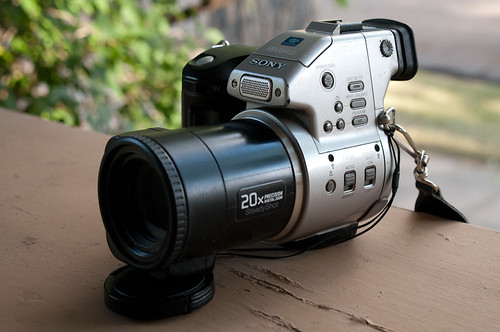
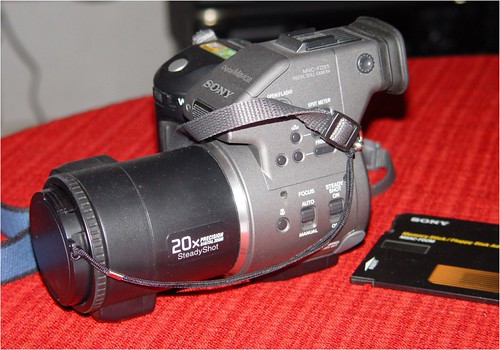
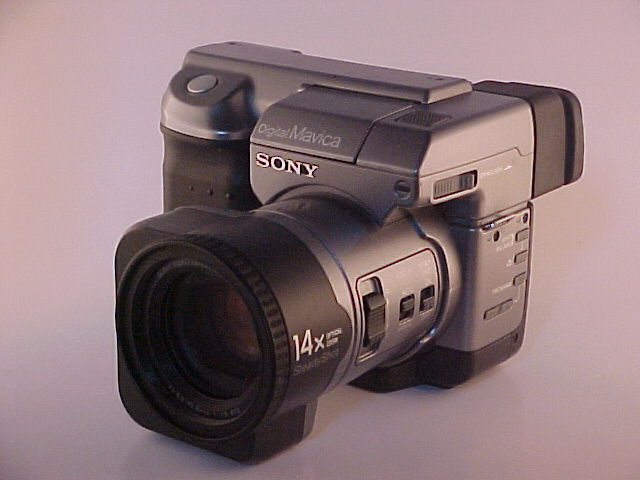
Only four Mavica models have an EVF: the FD91, FD95, FD97, and CD1000.
How the EVF works
The Mavica EVF is a tiny color LCD screen (roughly 0.44" diagonal, ~113,000 pixels) mounted inside a viewfinder eyepiece with a diopter adjustment wheel. It displays the same live video feed as the main LCD — what you see is what the sensor sees.
Advantages of the EVF
- Bright sunlight: The LCD screen washes out in direct sun. The EVF is shielded by the eyepiece housing, making it usable in any lighting condition.
- Stability: Pressing the camera against your face adds a third contact point (left hand, right hand, face) that significantly reduces camera shake — especially important on the FD91's 14× zoom.
- Battery life: You can turn off the main LCD and use only the EVF, which draws less power and extends battery life.
Limitations
- Low resolution: At ~113,000 pixels, the EVF is too coarse for critical focus checking. It's good for composition and exposure, but manual focus should be confirmed on the main LCD.
- Eye relief: Wearing glasses can make the EVF harder to use. The diopter adjustment helps but doesn't fully compensate for all prescriptions.
- Color accuracy: The EVF's tiny LCD has limited color gamut. Use the main LCD to evaluate white balance and color.
When to use each
| Situation | Recommended |
|---|---|
| Bright outdoor shooting | EVF |
| Telephoto zoom (8×+) | EVF (for stability) |
| Low-angle or high-angle shots | LCD (flip/swivel) |
| Video framing or color evaluation | LCD |
| Extending battery life in the field | EVF with LCD off |
| Macro photography | LCD (easier to see fine detail) |
Practical tips
- On the FD95 and FD97, the LCD swivels outward — flip it around for self-portraits while using the EVF for setup.
- The diopter wheel on the EVF eyepiece adjusts from roughly -3 to +1 diopter. Set it once for your eyes and leave it.
- If your Mavica doesn't have an EVF, try bracing the camera against your chest or a solid surface to approximate the stability benefit.
Related Knowledge
Autofocus on Mavica
How contrast-detect autofocus works on Mavica cameras — its strengths, limitations, and tips for getting sharp results with a late-1990s AF system.
Camera TechnologySensor Sizes Explained
A guide to the fractional-inch sensor size notation (1/4", 1/3", 1/2.7", 1/1.8") used across the Mavica lineup and how it affects image quality.
Camera TechnologyLCD Screen Replacement on Mavica Cameras
The flip-out LCD is one of the most common failure points on floppy and CD Mavica cameras. This guide covers diagnosis, sourcing replacements, and the repair process for the ribbon cable and LCD panel.
Repair & Restoration